Behind the scenes: Why we built Asset Bank's new consent manager

A practical guide to keeping content in the right hands, proving permission and responding when consent changes
When an image library grows, so can the risk. Users find an image they like, download it and use it without knowing whether they are allowed to.
An identifiable person in a photograph may be personal data. That means your organisation needs a clear, lawful basis for processing it. They need appropriate controls around access and a reliable way to honour restrictions.
Consent may be the right lawful basis in some situations, but not every situation. Where you do rely on consent, the UK GDPR standard is high: it should be specific, informed and freely given, and you need evidence of exactly what the person agreed to.
Storing images in one folder and consent forms in another leaves too much to memory.
A safer approach is to connect permissions, usage rules and consent evidence directly to the relevant image inside a digital asset management solution. Then the asset itself can tell users whether it is ready to use, restricted, awaiting approval or no longer available.
Why unrestricted image downloads create a compliance gap
Shared drives and open folders are convenient, but they tend to treat every image in the same way.
A headshot approved for a staff biography, a photograph licensed for one campaign and an image of a child with time-limited parental consent may all appear equally downloadable.
But once a file leaves the central library, context is easily lost. The user might not see the permitted channels, territory, campaign, expiry date, photographer credit or consent conditions.
They might also keep a local copy after the central record changes, which means multiple versions start to appear. And when changes are made to the original, they’re no longer made to previously downloaded versions that a user might use instead.
The answer is to make the safest action the easiest action – give each person the access they need, show the rules at the point of use and add approval where the risk calls for it.
 What good image download control looks like
Effective access control should be based on roles, teams and the sensitivity of the content. A DAM should let administrators decide who can view, download, approve and manage assets, with different rules for different folders or collections.
For example, your organisation might allow:
- all authenticated staff to view approved brand photography
- the marketing team to download web-ready versions without approval
- external agencies to access only the campaigns they support
- high-resolution or original files to require approval
- sensitive consent documents to remain visible only to administrators
This keeps content in the right hands without turning routine marketing work into a queue of manual requests. It also protects original files and sensitive documentation from unnecessary exposure.
Can you attach GDPR consent to an image?
Yes – but it is more accurate to attach the full consent record and its conditions to the image. A signature alone does not prove that every future use is permitted.
The ICO says organisations relying on consent should record who consented, when and how they consented, and what they were told. Consent should also be granular, easy to withdraw and kept under review.
Your image record therefore needs enough structured information to answer practical questions before a download is allowed.
Useful consent and permission metadata includes:
- the person or people covered by the consent
- the relevant model release or consent form
- the purposes and channels covered, such as website, social media, print or paid advertising
- the organisation and any third-party controllers named in the consent
- the date consent was captured and the wording or form version used
- any territory, audience or campaign restrictions
- the expiry or review date
- the current status, such as valid, expiring, withdrawn or under review
- the owner responsible for reviewing the record
Connecting these details to the image turns consent from a document in storage into an active usage control.

A seven-step workflow for safer image use
- Choose and document the lawful basis. Do not assume every photograph requires consent or that consent is always appropriate. Ask your data protection or legal team to confirm the lawful basis and any additional rights needed for the intended use.
- Capture clear, specific permission. Explain who will use the image, for what purposes and for how long. Avoid vague, blanket wording. Where consent is the lawful basis, make withdrawal as easy as giving consent.
- Upload the image and consent evidence together. Create a direct relationship between the photograph and its form instead of relying on matching filenames or separate folders.
- Add structured usage rules. Record channels, territories, dates, credits and restrictions as searchable fields. Free-text notes help, but structured metadata is easier to filter, report on and automate.
- Apply role-based download permissions. Decide who can view, request, approve, download a rendition or download the original. Keep the consent document itself restricted where it contains personal information.
- Automate expiry and review. Alert the responsible owner before consent or a licence ends. At expiry, hide or block the image until its status has been reviewed. Additionally, automatically alert users who previously downloaded the file.
- Respond to withdrawal across every related asset. Find all photographs and derivatives connected to that person, stop future downloads and notify relevant users where action is needed on copies already in use.
How Asset Bank connects downloads, rights and consent
Asset Bank brings access controls and consent management into the same DAM workflow with our new consent manager.
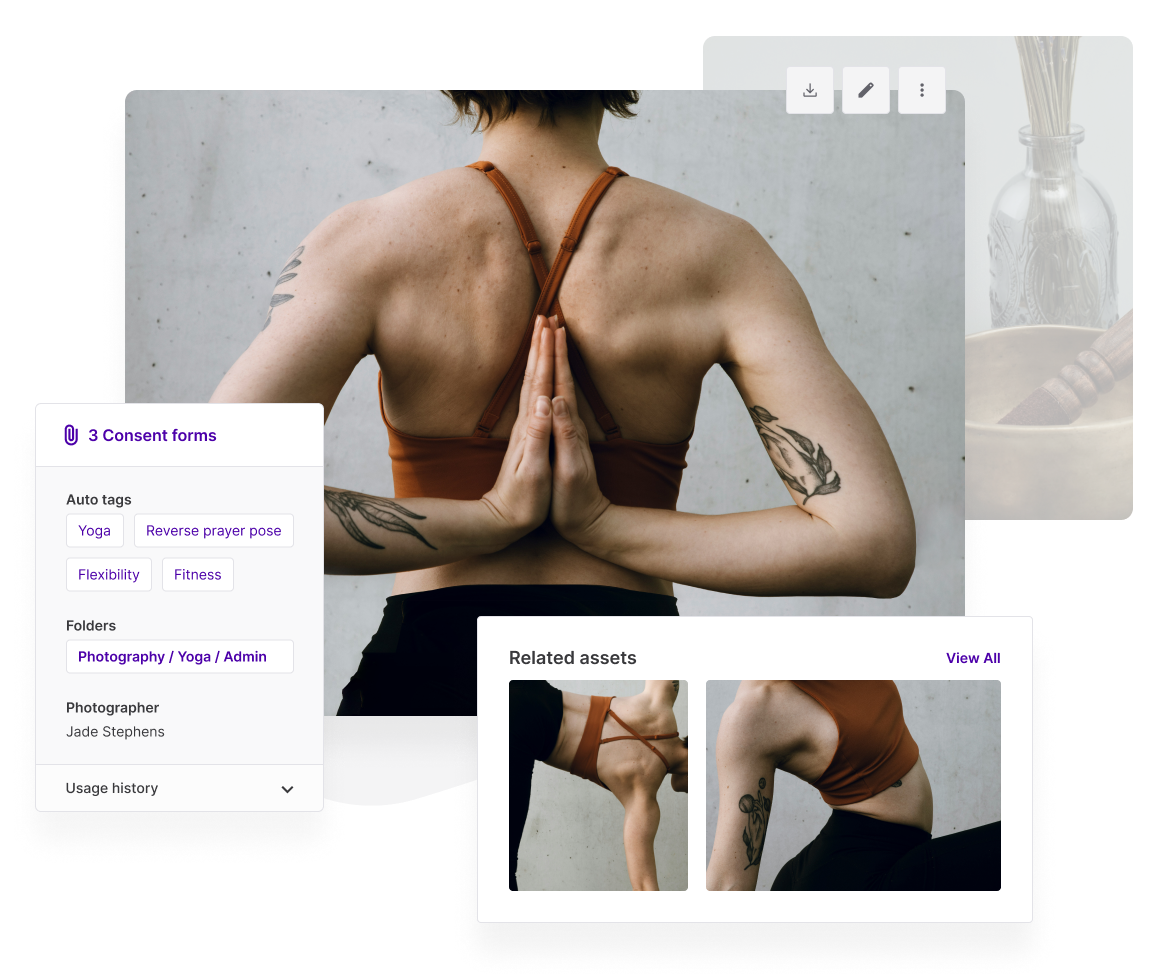
Model release and consent forms can be linked directly to the photographs they cover at the point of upload. Consent forms can remain hidden from ordinary search results and restricted to administrators, while the images carry the usage information a marketer needs.
Expiry dates can be used to expire and hide the relevant image/video/audio file, alert administrators and notify people who previously downloaded it. If someone withdraws consent, the consent manager module makes it easier to find the affected images and remove them from circulation.
Administrators can also give groups different levels of access – from no visibility or view-only access to downloads that require approval. They can also control access to originals and high-resolution files.
The result is a practical compliance layer around the content library: people can use approved assets confidently, access stays controlled and rights are less likely to be separated from the files they govern.
▶️ Watch the walkthrough to see consent manager in action:
Questions to ask before choosing a DAM for consent management
When comparing systems, look beyond storage and search. Ask whether the platform can:
- set view, download and approval rights by group and content area
- restrict access to originals, high-resolution files and consent documents
- link one consent form to many images, or multiple forms to one image
- display usage restrictions before download
- record consent status, scope, review dates and expiry dates
- automatically hide or expire assets when permission ends
- identify every image associated with a person if consent is withdrawn
- alert administrators and previous downloaders when an asset can no longer be used
These capabilities turn compliance into a repeatable process instead of a last-minute check.
Keep image permissions with the image
Controlling downloads and managing GDPR consent should not be separate projects. They are two parts of the same question: can this person use this image for this purpose, right now?
A DAM designed for usage rights, permissions and consent management gives your team a reliable answer at the moment it matters. It reduces guesswork, protects sensitive records and helps prevent expired or withdrawn permissions from being overlooked.
With Asset Bank, marketers can find the right content and understand the rules attached to it before they download. That is how you keep content in the right hands, protect rights and stay on the best possible footing for compliance.
Ready to control image downloads and connect consent to your content? Book an Asset Bank demo to see how permissions, approvals, usage rights and model release forms work together.
Editorial note
This article provides general information, not legal advice. Organisations should confirm the appropriate lawful basis and image-use requirements for their circumstances. The ICO notes that its consent guidance is under review following the Data (Use and Access) Act.
Dont’ forget to share this post