Managing consent for photos and videos can be complicated, time-consuming and, for busy marketing teams, a source of uncertainty. We spoke to Paul Mulvee, Asset Bank's product manager, about the thinking behind the new consent manager, what customers told us, and how his team of developers set out to make consent management simpler, safer and more intuitive.
What prompted you to develop consent manager?
One of the things we kept hearing from our customers was that they understood the importance of managing consent, but weren't necessarily confident they were doing everything they needed to comply with GDPR.
They knew some of the basics, such as obtaining consent and keeping track of expiry dates, but GDPR can be complicated, and most marketing teams aren't legal experts. Nor should they need to be.
Asset Bank already had functionality that customers could configure to manage consent forms and associate them with their assets. But it wasn't a dedicated part of the Asset Bank product experience. It required configuration, and customers didn't always feel they had a clear picture of where they stood.
We saw an opportunity to change that.
We wanted to take consent management from something customers had to work at, to something that felt intuitive and was built into their everyday workflow.
That meant making it easy to get started, introducing safeguards to help prevent mistakes, and building in processes that support GDPR best practice, such as:
-
linking consent forms directly to photos and videos
-
automatically managing expiry dates
-
notifying people when consent expires
-
and making consent withdrawal straightforward to manage
But for me, the most important objective was giving customers that feeling of being in control. Knowing which assets have consent, which need attention, and being confident that content is being used compliantly.
Ultimately, we wanted to make it easy to do the right thing.
What were people telling you about how they managed consent?
We heard quite a range of experiences from our customers, as well as people outside of Asset Bank, and there were some common themes...
Some of the people we spoke to didn't have a DAM at all. They were keeping consent forms in folders on their network, or sometimes even in physical filing cabinets. The problem is that those forms aren't directly connected to the photos and videos they relate to, making it much harder to establish what consent exists for a particular asset.
We also spoke to customers who were relying on fairly informal processes. For example, some had been relying on verbal consent from members of staff, without a clear record of what had been agreed, or what would happen should that staff member leave. This approach creates obvious challenges when you need to demonstrate that the appropriate consent was obtained.
Another recurring theme was uncertainty about GDPR itself. Customers understood that consent was important, but they weren't necessarily sure about the details. What happens when consent expires? Should you retain the original consent form? What do you need to do if someone withdraws their consent?
And there's a practical reality here too. The people responsible for managing a DAM are typically marketing professionals. They're already incredibly busy, juggling campaigns, content creation and a whole range of other responsibilities.
The last thing they want is another manual administrative process involving spreadsheets, paperwork and chasing people for information.
But what struck me most was the underlying anxiety.
Customers were worried that they might be missing something. Perhaps a consent form hadn't been linked to the right images, or an expiry date had passed without anyone noticing.
They didn't necessarily have a clear way of knowing whether everything was under control.
That was really the problem we wanted to solve. Not just making consent management more efficient, but helping customers feel confident that nothing important was being overlooked.
How did you approach designing consent manager?
We started by really immersing ourselves in the problem.
One of our product designers, a senior developer, and I sat down and went through the process of configuring consent management in Asset Bank as it existed at the time.
We created realistic test scenarios, with sets of photographs from mock photoshoots and corresponding consent, or model release forms. We then went through the whole process of uploading the content, linking consent and managing it.
That was incredibly useful. It helped us understand not just how the existing functionality worked, but how it actually felt to use.
Where were the confusing bits?
What required too many steps?
What might be difficult for somebody using it for the first time?
We deliberately tried to look at the experience through the eyes of a novice user. I've always felt that a well-designed feature should be intuitive from the outset. You shouldn't need extensive training or specialist knowledge just to get started.
Alongside that, we interviewed lots of existing Asset Bank customers, asking them to walk us through their processes and tell us, in their own words, what they found difficult or frustrating.
Something else happened around that time that influenced our thinking. We attended a webinar called Product Delight: How to Build Experiences Users Actually Enjoy.
It was a really engaging session, and it made us think more deeply about the emotional side of product design.
We'd already identified the functional problems we needed to solve. But how did we actually want customers to feel when using consent manager?
The answer was that we wanted them to feel supported, confident and in control.
That thinking helped shape several important design decisions.
We wanted consent management to become a first-class part of Asset Bank, with prominent actions such as a 'Link consent' button, rather than functionality that users had to discover or configure themselves.
We also wanted safeguards built into the workflow. For example, if somebody uploads a photograph that requires consent, it shouldn't be available for anyone to use until the appropriate consent form has been linked.
That's a simple principle, but a powerful one. It helps prevent mistakes without relying on somebody remembering to check.
Plus, we wanted a dashboard that would give administrators a clear picture of their consent status and what needed attention.
For us, good product design meant understanding both the practical problem and the human experience behind it.
What was the biggest design challenge?
Probably the consent linker element.
On the surface, linking a consent form to a photograph sounds relatively straightforward. But when you start looking at real-world scenarios, it quickly becomes more complicated.
Imagine a university photoshoot involving 20 students. You might have dozens of photographs, with different combinations of students appearing in each one. You then need to make sure the right consent forms are linked to the right photographs.
Our initial idea was fairly simple. Users would select some images in the main Asset Bank interface and then open a pop-up to link the relevant consent forms.
But when we tried it, we realised it wasn't a particularly good experience. You could work through a group of images featuring the same people, but then you'd have to go back, select another group and repeat the process.
It quickly became quite cumbersome.
That's when we decided to design a dedicated consent linker.
We settled on a two-panel interface, with assets requiring consent on the left and consent forms on the right. Users can select multiple items on either side and link them together, whether that's one consent form covering many images, several consent forms covering one image, or multiple forms and multiple images.
We then started adding little touches to make the experience easier.
For example, the most recently uploaded content appears first, because we recognised that people are often linking consent shortly after a photoshoot.
We also made the linker context-aware. If you've already selected a particular set of photos or consent forms before opening it, those are the items you'll see.
So if you're working on a specific photoshoot, you can focus entirely on that content without being distracted by consent and photos from other shoots.
We added filtering to both panels too, so you can narrow things down by photoshoot or even by who uploaded the content.
Another useful addition was showing the number of consent forms linked to each image. It means you can scan a photoshoot and quickly spot where you might need to check something.
We even explored whether AI could help by identifying the number of faces in each photograph and requiring a corresponding number of consent forms before allowing users to proceed.
But we realised that would be too restrictive. Some customers use a single consent form signed by an entire group, for example. So five faces doesn't necessarily mean five separate consent forms.
It was a useful reminder that good design isn't always about automating everything. Sometimes it's about giving people the right tools and allowing enough flexibility for different ways of working.
Click through the consent linker product tour below to see how to link consent forms directly to your assets:
The consent dashboard is a central part of the new feature. What was the thinking behind it?
The dashboard was actually one of our early 'aha' moments.
We realised that if we wanted customers to feel in control of consent, we needed to give them somewhere they could immediately see how things stood.
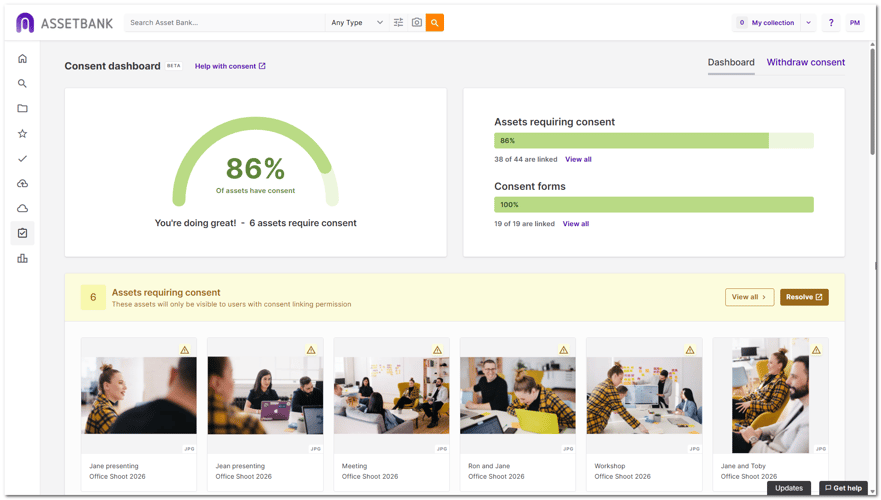
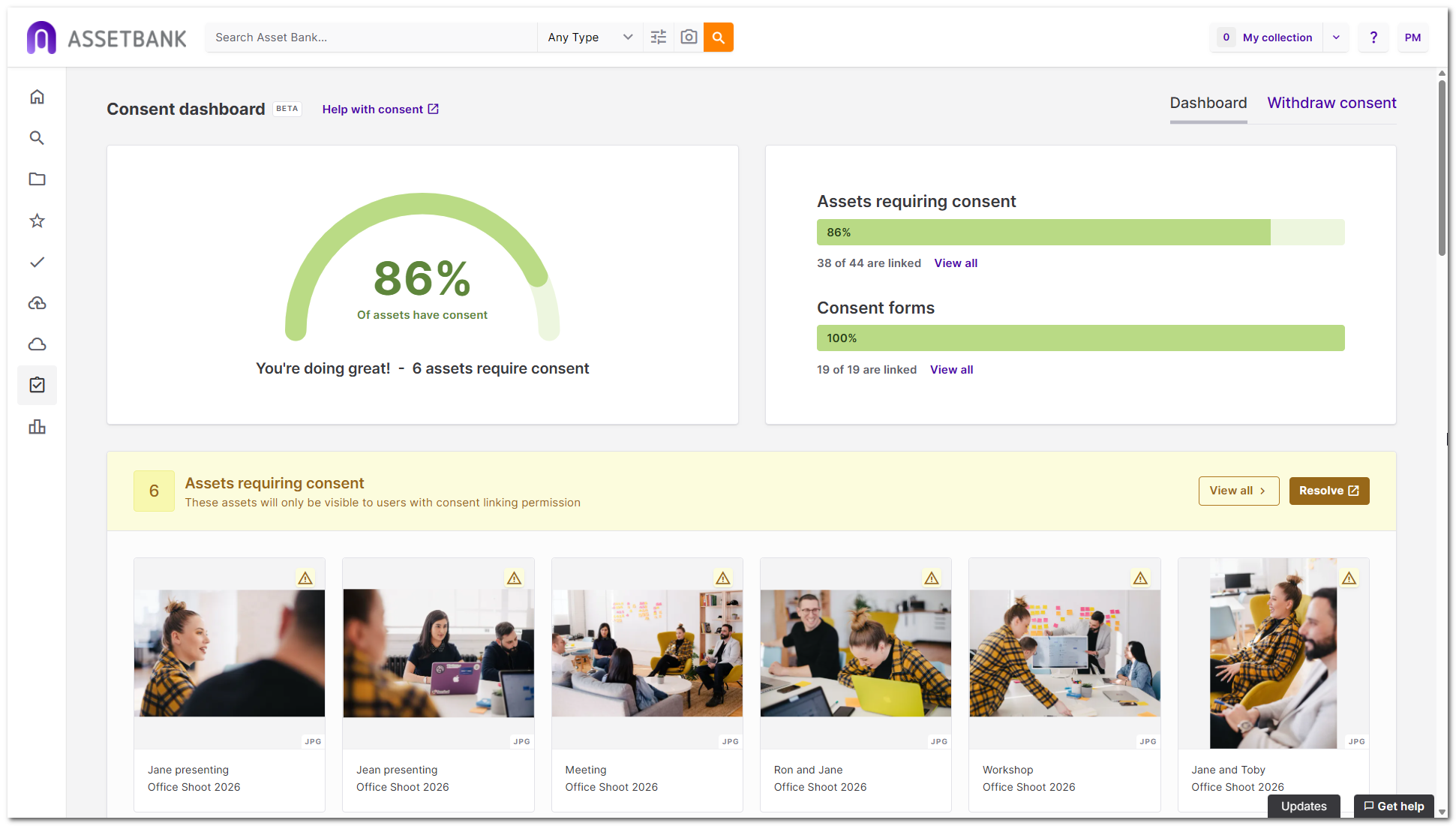
We wanted to start with something visual and reassuring, so we came up with a speedometer-style graphic showing the percentage of assets requiring consent that actually have consent linked.
It's a simple idea, but I think it's quite powerful. An administrator can open the dashboard and immediately get a sense of how well things are under control.
The dashboard doesn't just tell you how you're doing. It helps you see what needs attention and gives you a straightforward way to do something about it.
But we didn't want to stop at showing statistics. The next question was: what does somebody need to do?
So we created a section that highlights assets that require consent but don't yet have it linked.
Those assets are automatically unavailable for download, which is an important safeguard. But it also means they're not delivering value to the organisation. They're potentially great photographs or videos that marketing teams can't yet use in their campaigns.
We wanted to make it really easy to unlock that value. Administrators can jump straight to a search showing all the affected assets, or open them directly in the Consent Linker.
Then we had another idea. What if we grouped those outstanding assets by the person who uploaded them?
That makes it much easier to follow up. You can see who has outstanding consent to sort out and give them a nudge. Or, if somebody is on holiday or has left the organisation, another administrator can pick up where they left off.
We also knew from our customer conversations that consent expiry needed more attention.
For example, if photographs are being used in an ongoing campaign, customers will sometimes contact the people involved to ask whether they're happy to extend their consent.
We already had email alerts for upcoming expiry dates, but we wanted to make that information more visible. So the dashboard highlights consent that's approaching expiry, with a link to see everything due to expire within the next 30 days.
We also included recently expired consent, giving administrators another opportunity to spot something important and arrange an extension where appropriate.
Finally, we added a record of withdrawn consent, showing when consent was withdrawn and the reason.
Click through the consent dashboard product tour below to see how to see your consent status at a glance:
How did you approach consent expiry and withdrawal?
For us, automatic expiry was absolutely essential. We already have that principle built into Asset Bank more generally, so it made sense to carry it through into consent manager.
When consent expires, the associated assets are automatically marked as expired and, by default, are hidden for non-administrator user groups.
Nobody has to remember to go in and manually change their status.
But we also needed to think about what happens outside Asset Bank.
An image might have been downloaded weeks or months earlier and could still be appearing in a live campaign. Simply hiding it in the DAM doesn't solve that problem.
So we alert people who previously downloaded the affected assets, giving them the information they need to stop using them.
We also decided to send an alert ten days before expiry. That gives people some advance warning and an opportunity to take action, rather than finding out after the event.
Consent withdrawal presented a slightly different challenge because we wanted the response to be immediate.
Imagine somebody contacts a university and says they no longer want their image to be used. The last thing an administrator needs is a complicated process involving manually finding every associated photograph and changing its status.
We wanted to make that as simple and reassuring as possible, so we designed a guided withdrawal process.
An administrator goes to the withdrawal page, searches for the relevant consent form and clicks 'Start withdrawal'.
We then give them the opportunity to open a view of all the assets linked to that consent form, so they can check exactly which photographs or videos will be affected.
The wizard explains what will happen, asks the administrator to confirm they've understood, and lets them record the reason for withdrawal. That reason is captured in the audit history.
Once they confirm, the associated assets are immediately expired and restricted.
Email alerts are also sent to people who previously downloaded the affected files.
We paid particular attention to those emails. They include filenames and small thumbnails of the affected assets, so recipients can immediately recognise which photographs or videos we're talking about.
It's a relatively small design detail, but it makes a real difference.
The principle throughout was to make safeguards automatic wherever possible, and make the actions people do need to take simple, clear and reassuring.
Click through the consent withdrawal product tour below to see how to quickly remove assets when consent has been withdrawn:
How did customers react when you showed them the prototypes of consent manager?
Customers’ initial reactions to consent manager were really positive, which was encouraging because we'd spent a lot of time trying to understand the problems customers were facing.
Two things stood out in particular: the safeguards and the dashboard.
Customers loved the idea that assets requiring consent would automatically be unavailable for use until the appropriate consent was linked.
The consent dashboard also got a really enthusiastic response.
One feature customers particularly liked was being able to see which users had uploaded assets that were still waiting for consent, as it meant they could approach them directly and nudge them to complete the work.
It sounds like a small thing, but for a busy DAM administrator, knowing exactly who to follow up with can make a huge difference.
The consent linker was well received too. Customers felt it looked straightforward to use, while still offering the flexibility they needed for more complicated photoshoots.
Our customer success managers have also been demonstrating the consent manager feature to other customers, and the response has continued to be really encouraging.
We've had comments like:
"It'll make our lives easier."
"Consent manager is perfect! It's exactly what we need!"
For me, that was particularly satisfying because it suggested we'd addressed the problems we'd originally set out to solve.
Looking back, what are you most proud of?
I think I’m most proud of being able to take a fairly complex problem and distil it into something that feels simple and intuitive.
There were moments during development when we nearly went down the wrong path. We'd come up with an idea that seemed perfectly sensible, but when we looked at it again through the eyes of a typical customer, we realised it would actually make things more complicated.
That's something we kept coming back to. Just because a feature makes sense to the people building it doesn't necessarily mean it will make sense to somebody using it for the first time.
I'm really pleased with the simplicity of the experience we've ended up with, particularly given the complexity of some of the scenarios it needs to support.
I've also really enjoyed the conversations with customers along the way. Every organisation seems to have its own slightly different requirements, and understanding those nuances has been fascinating.
The challenge was to create something that works really well straight out of the box, without requiring lots of configuration, but still gives customers the flexibility to tailor it to their needs.
For example, they can add bespoke metadata to the new consent-related asset types if they have particular information they need to capture.
Another interesting part of the journey has been developing my own understanding of GDPR and the principles behind it.
I've spent a lot of time getting closer to the subject, and I've even run internal workshops on GDPR and consent to help our wider team understand it better.
One thing I've learned is that GDPR is often more nuanced than people expect.
Take consent expiry dates, for example. People sometimes assume GDPR specifies that consent must expire after five years. It doesn't.
What's important is understanding the purpose for which consent was given, ensuring people know how their information will be used, and having appropriate policies and processes for reviewing whether that consent remains valid. The appropriate period can vary depending on the circumstances.
That's been a useful learning experience for us as a team.
And I think it reflects what we were ultimately trying to achieve with consent manager.
We wanted to take something that can feel complicated and intimidating, and make it straightforward for the people who have to manage it every day.
If we've helped marketing teams spend less time worrying about consent, feel more in-control of their content, and get on with creating great campaigns, then I think we've achieved something worthwhile.
Manage consent with confidence
Asset Bank's new consent manager brings consent forms, photos and videos together in one place, with intuitive linking, automatic safeguards, expiry alerts and a clear dashboard showing what needs attention.
Simple for marketers. Strong on compliance. Helping teams move fast with confidence.
Discover Asset Bank's consent manager or book a demo to see how it works.
Dont’ forget to share this post