DAM managers are custodians of context – not just metadata
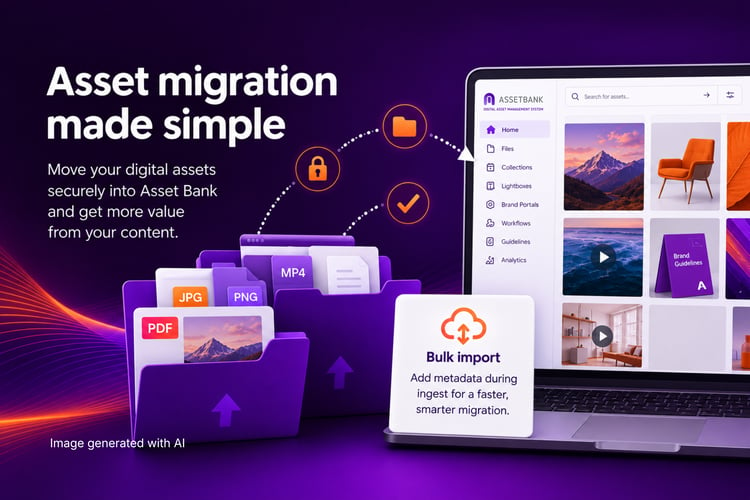
Here at Asset Bank, we offer to assist our clients with their asset and meta migrations. Not all DAM vendors offer this, so here’s all you need to know if you’re considering migrating your assets yourself.
Understanding this difference may help you decide which DAM is best for you.
What does asset migration mean?
Asset migration, AKA data migration, AKA data transfer is the process of moving digital files and their associated metadata from one system to another. In the context of digital asset management (DAM), this usually means transferring images, videos, documents and other content from an existing storage location or to a new DAM, or moving files from an existing DAM into a new DAM system.
A successful asset migration moves not only the files themselves, but also important information such as metadata, folder structures, keywords, permissions and usage rights where appropriate.
What does it involve?
An asset migration typically includes:
- We'll provide you with an Amazon S3 bucket.
- As the client, you’ll need to copy all your assets from your existing DAM software/network/shared drives, etc, and move them into that bucket.
- You’ll also need to provide us with an export of your metadata, such as titles, descriptions, keywords and copyright information (assuming you have these details). This will need a unique identifier, which we can then map back to your assets as we upload them into your new Asset Bank.
- Using the Amazon S3 bucket, we will then import your assets into Asset Bank.
- We’ll recreate your folder structures where required.
After that, you’ll move to our onboarding process, which will involve checking that permissions, user access and collections have been configured correctly, as well as checking the site structure and attributes (metadata fields) meet what you need. And then your admins will move into the training phase of our onboarding process.
Some organisations also take the opportunity to clean up duplicate, outdated or low-quality assets before migrating. We can help with this by identifying any duplicates in the files you provide, and highlight them for you to review and remove/delete.
Who typically migrates assets?
Asset migrations are usually carried out by:
- Your internal marketing, IT or digital asset management team
- You, together with your new DAM provider's implementation or onboarding team – this conjoined approach is what we offer our customers
- A specialist migration partner or consultant, which would obviously incur additional costs
Many organisations choose to work with their DAM provider because they understand how the new platform is structured and can help ensure metadata is imported correctly.
How complex is it to transfer assets into new DAM software?
It depends on the size and complexity of your asset library.
A migration can be relatively straightforward if you have well-organised folders, consistent metadata and a manageable number of files.
It becomes more complex when organisations have:
- Thousands of assets
- Multiple storage locations
- Legacy DAM systems
- Complex permissions and user groups
- Large numbers of duplicate or outdated files
- Inconsistent or incomplete metadata
This last one is key. If you are uploading your own assets, you’ll ideally be tagging them as you import them. Doing this manually is a very lengthy process.
The technical process of moving files is often the easy part. Cleaning, organising and mapping metadata is usually what takes the most time.
How long does it take to transfer assets and metadata?
There is no fixed timeframe, as every migration is different.
A small migration involving a few thousand well-organised assets may be completed in a matter of days.
Larger enterprise migrations involving hundreds of thousands of assets, metadata mapping, user setup and testing can take several weeks or months.
The biggest factors affecting timescales are:
- Number of assets
- Quality of metadata
- Complexity of folder structures
- Number of users and permission groups
- Whether assets need cleaning before import
Most DAM providers can give an estimated timeline after reviewing your existing library.
How can I speed up the process?
Asset and metadata migrations are two-pronged processes, and the best thing you can do to speed up the process, is to clean up your content.
- Gather all the assets you want to migrate into Asset Bank.
- Audit your asset library and remove any temporary files, database files or zero-byte files.
- Rename any files or folders that contain unusual or non-standard characters (such as ö, â or ñ) to help avoid import issues.
- Remove duplicate assets where possible. If you need assistance, we can help identify and manage duplicates after the migration.
- Don't compress your assets into ZIP files. Asset Bank imports files as they are uploaded and won't automatically extract compressed folders.
 What’s the benefit of doing it yourself vs your DAM provider doing it for you?
Doing it yourself
Benefits include:
- Greater control over the migration process
- Potentially lower implementation costs
- Flexibility to migrate at your own pace
- Internal teams gain a better understanding of the new system
However, you'll need the time, technical knowledge and resources to prepare data, map metadata and validate the migration.
Having your DAM provider do it
Benefits include:
- Faster implementation
- Reduced workload for your internal team
- Lower risk of metadata mapping errors
- Experience migrating from a wide range of legacy systems
- Best practice advice on folder structures, metadata and permissions
- Support with testing and validation before launch
For many organisations, particularly those with large or complex content libraries, provider-led migration reduces risk and helps ensure the new DAM is configured correctly from day one.
The ideal approach is often collaborative: your team provides the business knowledge about your assets, while the DAM provider handles the technical migration and offers guidance on best practice.
What’s not so good about in-housing your asset migration?
It takes longer than most people expect
Moving the files is only one part of the project. Preparing metadata, checking file quality, removing duplicates, mapping fields and validating the import can take significantly longer than anticipated – especially if your asset library has grown organically over many years.
Metadata can be lost or mapped incorrectly
Every DAM stores metadata differently. If fields aren't mapped correctly during import, you could lose valuable information such as keywords, copyright details, usage rights, photographer credits or expiry dates. Correcting this after the migration can be time-consuming.
You're responsible for identifying issues
Experienced DAM providers know what to look out for because they've completed hundreds of migrations. Internal teams may only migrate assets once every several years, so problems like unsupported file formats, missing metadata or broken folder structures often aren't discovered until later.
It places extra pressure on your team
Marketing, creative and IT teams usually have full-time jobs already. Running a migration alongside day-to-day work can slow down the project and pull people away from other priorities.
Permissions may need rebuilding
Permissions, user groups and workflows rarely transfer automatically between DAM systems because each platform handles them differently. Recreating these manually can be complex, particularly in organisations with multiple departments, brands or external users.
There's more testing to do
After importing assets, someone still needs to check that:
- Assets display correctly
- Metadata appears in the right fields
- Search functionality works as expected
- Downloads behave correctly
- User permissions are accurate
- Links and integrations still function
Without thorough testing, problems may only become apparent once users start relying on the new system.
Downtime can be longer
If unexpected issues arise, a self-managed migration may take longer to resolve because your team has to investigate and fix them. Providers who perform migrations regularly often have established processes and tools to troubleshoot common issues more quickly.
The opportunity to improve your DAM may be missed
A migration isn't just about moving content – it's a chance to improve how your assets are organised. An experienced DAM provider can recommend better folder structures, metadata models, taxonomy, permissions and governance based on best practice. If you migrate everything exactly as it exists today, you may carry old inefficiencies into your new system.
When does it make sense to do it yourself?
A self-managed migration can work well if you have:
- A relatively small asset library
- Clean, consistent metadata
- Internal DAM or technical expertise
- Plenty of time to plan, test and validate the migration
For larger organisations with complex permissions, multiple user groups or hundreds of thousands of assets, working with your DAM provider is often the lower-risk option. It can reduce implementation time, minimise disruption and help ensure your new DAM is set up effectively from the outset.
|
Consideration |
Do it yourself |
Use your DAM provider |
|---|---|---|
|
Cost |
Lower upfront cost |
Higher initial investment, but fewer internal resource costs |
|
Time |
Usually takes longer, especially if your team is learning as they go |
Typically faster thanks to established migration processes |
|
Internal workload |
Requires significant input from marketing, IT or DAM administrators |
Most of the technical work is handled for you |
|
Migration expertise |
Depends on your team's experience |
Experienced specialists who have completed many migrations |
|
Metadata mapping |
Higher risk of incorrect or incomplete mapping |
Metadata is mapped and validated using proven methods |
|
Risk of errors |
Greater chance of missing files, metadata or configuration issues |
Lower risk due to specialist knowledge and testing |
|
Permissions and user groups |
Must usually be recreated manually |
Provider can help design and configure permissions correctly |
|
Testing and validation |
Your team is responsible for checking everything works |
Provider carries out testing and resolves issues before launch |
|
Best practice advice |
Limited to internal knowledge |
Guidance on metadata, taxonomy, folders, governance and user adoption |
|
Business disruption |
May take staff away from day-to-day responsibilities |
Reduces pressure on internal teams and helps minimise downtime |
|
Best suited to |
Small, well-organised libraries with in-house expertise |
Medium to large organisations or complex DAM implementations |
At a glance
|
If... |
The best option is... |
|
You have fewer than 10,000 well-organised assets and a technically confident team |
Consider managing the migration yourself |
|
You have multiple user groups, complex metadata, permissions or a large asset library |
Let your DAM provider manage the migration |
|
You want to minimise risk and get up and running quickly |
Use your DAM provider |
|
You want complete control and have plenty of time available |
Consider a self-managed migration |
One point that's worth emphasising is that it doesn't have to be all or nothing. Many organisations take a hybrid approach: they prepare and clean their assets internally, while the DAM provider handles the technical import, metadata mapping and validation. This often provides the best balance of control, speed and reduced risk.
A successful asset migration is about more than moving files
Asset migration is one of the most important stages of implementing a new DAM. While moving the files themselves is relatively straightforward, ensuring that your metadata, permissions, folder structure and governance are carried across correctly is what determines the long-term success of your system.
For smaller, well-organised libraries, a self-managed migration can be a practical option. But for organisations with large asset collections, complex permissions or multiple teams, working with an experienced DAM provider can significantly reduce risk, save time and help you get more value from your investment.
Ultimately, a migration isn't just an opportunity to move your assets – it's an opportunity to improve how they're organised, managed and discovered. Taking the time to get it right will make your new DAM easier to use, easier to govern and more valuable to your organisation for years to come.
Want to find out more? Chat to the Asset Bank team to discuss your DAM requirements.
Frequently asked questions
What is metadata mapping?
Metadata mapping is the process of matching metadata fields from one system, format or structure to the corresponding fields in another.
Mapping ensures information is transferred consistently and remains usable. It may also involve transforming values – such as changing date formats, standardising keywords or translating “Yes/No” into predefined consent statuses.
In a DAM, effective metadata mapping helps teams:
- Find assets more easily
- Preserve copyright, licence and consent information
- Apply access and usage controls correctly
- Maintain consistent metadata across integrations
- Migrate content without losing important context
Put simply, it tells one system: “This field means the same thing as that field.”
What are metadata fields?
Metadata fields are labelled spaces used to store specific information about a file or digital asset.
For an image in a digital asset management (DAM) system, metadata fields might include:
- Title
- Description
- Photographer
- Date created
- Location
- Keywords
- Copyright owner
- Image licence
- Usage restrictions
- Licence expiry date
- Consent status
Each field holds one type of information. For example, the Photographer field might contain “Jane Smith”, while the Licence expiry date field might contain “31 December 2027”.
Metadata fields make assets easier to search, organise and manage. They can also help teams stay compliant by recording usage rights, permissions and consent alongside each asset.
How do I migrate my assets myself?
Asset Bank supports secure FTPS uploads, allowing you to transfer your assets at a time that suits you, while preserving your existing folder structure.
Using an FTP client, such as FileZilla, you can upload files directly to your dedicated Asset Bank upload directory. Once the transfer is complete, use Asset Bank's bulk import tool to ingest your assets and apply metadata during the import process, helping you organise your content from day one.
Want to chat to our team to learn more? Email us at info@assetbank.co.uk, or book a demo to speak to our consultants.
Dont’ forget to share this post